Download OffiStar XLS DOC PPT editor free on android
APK file OffiStar 9.9.3How to install APK / APKS / OBB file on Android
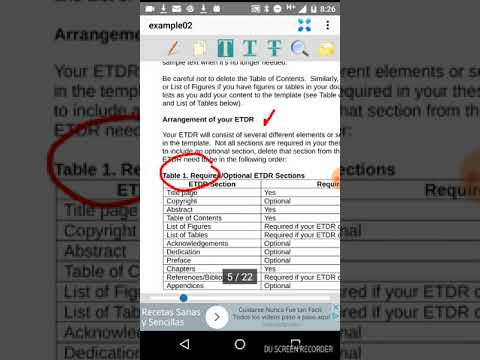

Work from anywhere with any type of document: XLS spreadsheets, DOC documents, PPT slides, ODT standard files. OffiStar allows you to view and make comments over any kind of documents. OffiStar is a light office suite for your documents that acts as a document viewer but at the same time you can make comments over the documents.
OffiStar can open almost any file type including PDF, documents, presentations and spreadsheets with high fidelity. It means that when you use OffiStar to open a document from your email appor own file manager, you can be sure it will look exactly the way it would on your PC.
Note that OffiStar converts all the documents in our servers so the Internet is required.
Key features:
* Fully compatible with the most recognized Office Suites, so it can open documents (DOC / DOT / RTF / ODT / ODS / ODP / ODG / ODF / DOCX / DOTX / DOCM), spreadsheets (XLS / XLT / XLSX / XLTX / XLSM), presentations (PPT / POT / PPTX / POTX / PPTM), Text (TXT / CSV and HyperText Markup Language (HTML)
* Email Attachments. You can view and edit Office documents attached to email messages.
* Make comments over the documents.
* Highlight texts in the documents.
* Underline texts in the documents.
* Email Attachments. View and edit documents attached to email messages.
* Access documents from any application that uses the Android GET_CONTENT filter when open a document.
* Share documents and presentations.
* Recent Documents, available on your phone in the folder OffiStar.
* High fidelity in the way that documents are displayed.
* File manager.
Better performance for conversion from documents with the following formats: Microsoft Word, Microsoft Excel and Microsoft Powerpoint.
Interstitial in a transition screen with an indication.
- LicenseFree
- File nameOffiStar
- File Version9.9.3
- Package nameorg.redcoolmedia.offistar
- UploadedNovember 9, 2023
- CategoryProductivity
- DeveloperRedCool Media SL
- Developer site
- Developer emailredcoolmedia@inbox.com
- Permissionsshow (15)